
Safeguarding Accounts- Copy for LLMCopy page as Markdown for LLMs
- View as Markdown
 Open this page as Markdown
 - Open in ChatGPTGet insights from ChatGPT
- Open in ClaudeGet insights from Claude
- Connect to CursorInstall MCP server on Cursor
- Connect to VS CodeInstall MCP server on VS Code
- Copy for LLMCopy page as Markdown for LLMs
- View as MarkdownOpen this page as Markdown
- Open in ChatGPTGet insights from ChatGPT
- Open in ClaudeGet insights from Claude
- Connect to CursorInstall MCP server on Cursor
- Connect to VS CodeInstall MCP server on VS Code
Electronic Money Institutions (EMIs) and Payment Institutions (PIs) are legally required to protect customer funds in the event of insolvency or operational failure.
A Safeguarding Account is a specialized account held by the EMI/PI to keep customer funds strictly segregated from the institution's own operational funds. This ensures that if the institution goes bankrupt, customer money is legally protected from creditors.
To understand this account, it is important to distinguish the entity types that use it:
- EMI (Electronic Money Institution): A company licensed to issue "E-Money" (digital equivalent of cash). Examples include digital wallets and prepaid card issuers.
- PI (Payment Institution): A company licensed to process payments (e.g., money remittance, acquiring) but not issue E-Money.
The Golden Rule: Unlike banks, EMIs and PIs are not allowed to lend customer money or mix it with their own operational funds (e.g., for paying salaries or rent). They must safeguard 100% of the funds received from customers in a segregated account at a licensed credit institution (like Solaris).
Solaris Safeguarding Accounts allow EMIs and PIs to comply with these regulatory requirements through a simple, secure infrastructure.
- Owner: You (the EMI/PI) are the sole account holder. Solaris has no direct relationship with your end customers.
- Closed Loop: The account is tied to one external reference account (typically another safeguarding account at a different bank).
- Reconciliation: You are responsible for daily reconciliation. Funds must be swept from your operational/collection accounts to the Safeguarding Account daily.
- Access: Accounts can be managed via the Solaris API or the Solaris Dashboard (WebUI).
This product provides the collective safeguarding ledger only. It does not provide individual vIBANs for your end-customers or payment initiation services (PaaS) for third parties.
- Business Onboarding: Your legal entity must pass full Business KYC (BKYC).
- Note: Legal representatives and authorized persons must complete video identification (initiated via links sent by Solaris Operations).
- External Reference: You must have an existing safeguarding account at another bank to serve as the external reference for pay-ins/pay-outs.
- Regulatory Status: You must be a licensed EMI or PI.
Regulatory standards require you to reconcile and safeguard funds daily. The collective balance of your customer accounts must always match the funds held in your safeguarding accounts.
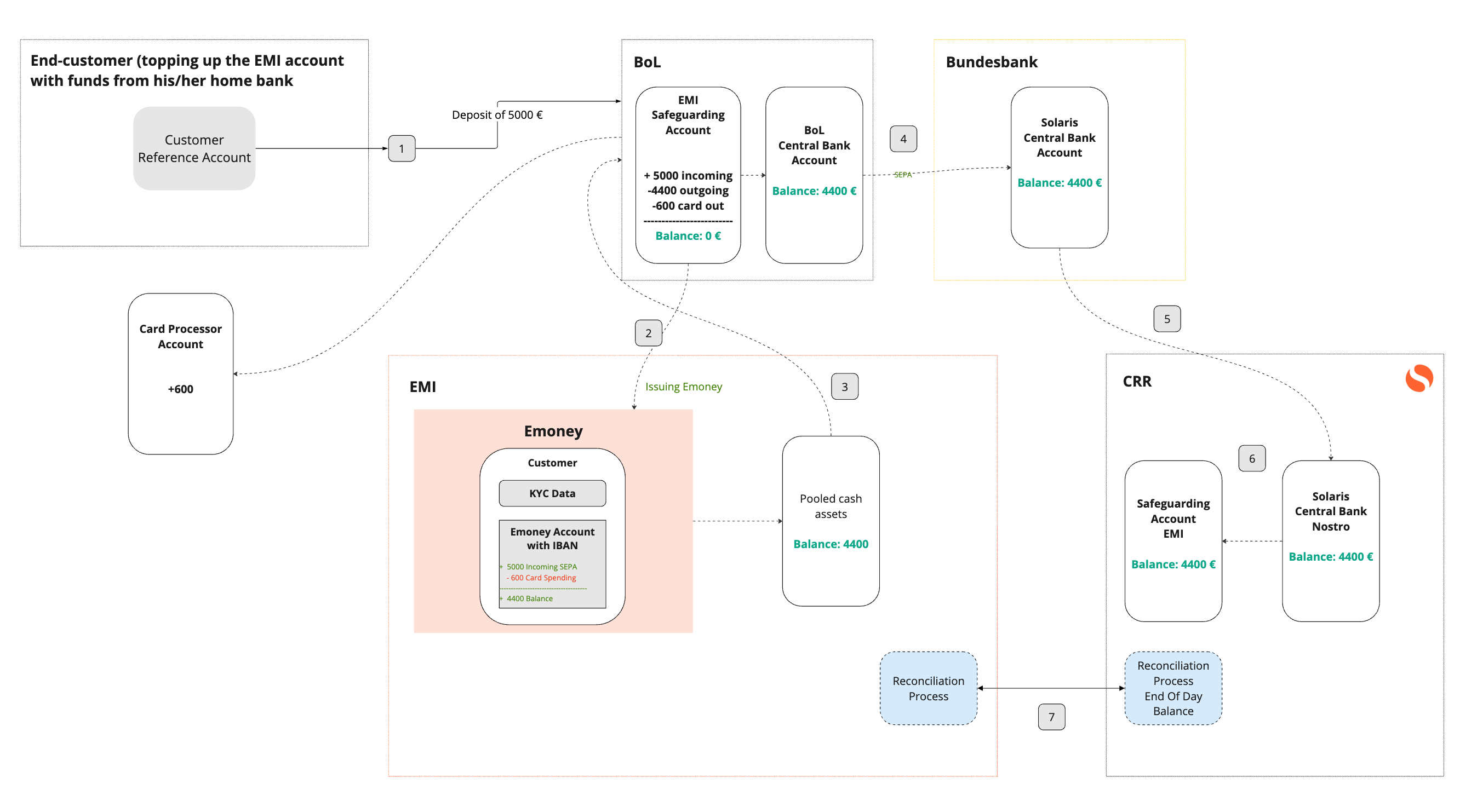
Funds collected from customers are transferred from your operational environment (e.g., BoL/Central Bank accounts) to the Solaris Safeguarding Account.
The diagram below illustrates the flow from End-Customer Deposit → EMI Account → Solaris Safeguarding Account:
When you need to return funds to the operational environment (e.g., for customer payouts), you transfer them from the Solaris Safeguarding Account back to the Reference Account.
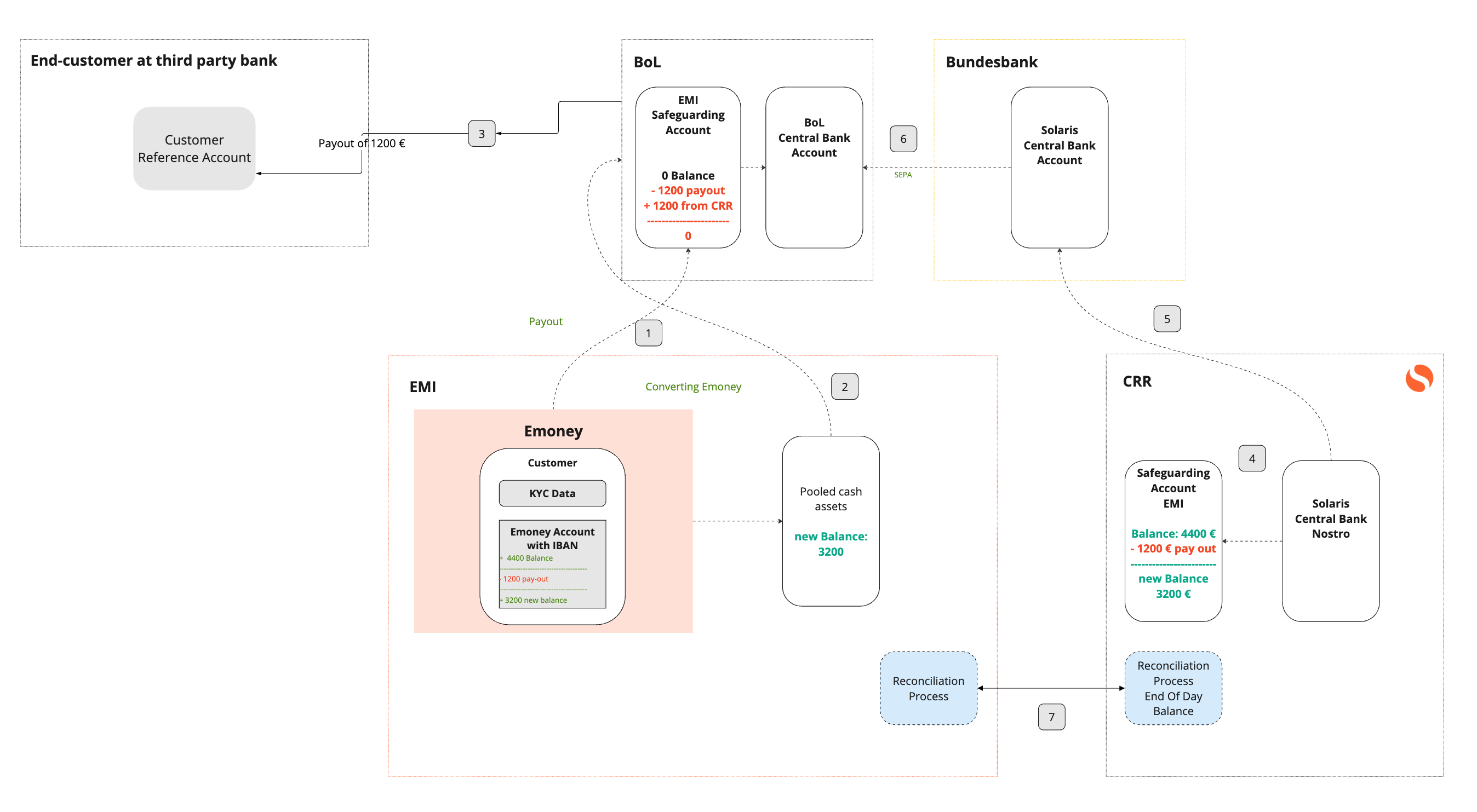
Since this is a B2B product where you are the customer, the integration focuses on account management and treasury movements.
Safeguarding accounts are opened during your onboarding phase with Solaris.
- Process: Handled during your onboarding process.
- Result: You receive the
account_idand IBAN of your new Safeguarding Account.
All fund movements are executed via Reference Account Payouts. You cannot send money to arbitrary third parties.
Initiate Payout: Transfer funds from your Safeguarding Account to your External Reference Account.
// POST /v1/accounts/{account_id}/reference_account_payouts
{
  "amount": { "value": 500000, "currency": "EUR", "unit": "cents" },
  "reference_account_id": "YOUR_EXT_REF_ID",
  "description": "Daily Liquidity Sweep",
  "reference": "sweep_ref_2023_10_01"
}
Track Payouts: Monitor the status of your sweep transactions.
GET /v1/businesses/{business_id}/accounts/{account_id}/reference_account_payoutsYou must perform daily reconciliation to ensure regulatory compliance. Use the Booking and Statement endpoints to fetch end-of-day balances.
Real-time Balance:
GET /v1/accounts/{account_id}/balanceTransaction History (Bookings):
GET /v1/accounts/{account_id}/bookingsOfficial Statements: Generate a PDF or JSON statement for your records.
POST /v1/accounts/{account_id}/statement_of_accounts