
Bankident API integration- Copy for LLMCopy page as Markdown for LLMs
- View as Markdown
 Open this page as Markdown
 - Open in ChatGPTGet insights from ChatGPT
- Open in ClaudeGet insights from Claude
- Connect to CursorInstall MCP server on Cursor
- Connect to VS CodeInstall MCP server on VS Code
- Copy for LLMCopy page as Markdown for LLMs
- View as MarkdownOpen this page as Markdown
- Open in ChatGPTGet insights from ChatGPT
- Open in ClaudeGet insights from Claude
- Connect to CursorInstall MCP server on Cursor
- Connect to VS CodeInstall MCP server on VS Code
This section provides step-by-step instructions for integrating Bankident as a standalone solution.
To use VideoIdent (IDnow) in an existing flow where a person resource and verified mobile number already exist, begin at Step 3.
Solaris recommends subscribing to the following webhook events to better automate your processes. For detailed instructions on implementing Solaris webhooks, check the webhooks documentation.
Integrate Bankident by completing these steps:

Integrate Solaris' Bankident by completing the following steps:
User registration
- Collect the mandatory customer data and consent to the legal and regulatory requirements in your sign-up flow, and create a person resource for your customer by completing Step 1.
- Create and verify the customer's mobile number by completing Step 2.
Identification creation & account verification
- Collect the customer's consent on Swisscom's terms and conditions as a UTC timestamp and create an identification resource for the customer using POST Create identification
- Trigger the identification process using PATCH Request identification.
- Redirect the customer to the URL returned in the response body of the previous call.
- The customer completes the account verification process by entering their IBAN and logging in to their bank account to authorize the cent payment.
Qualified Electronic Signature (QES)
- After successful payment transfer, display the relevant contract(s) to the customer in your UI before the signing process starts.
- Trigger the QES process by calling PATCH Start QES process. This action sends an SMS OTP to the customer's verified mobile number.
- The customer must enter the OTP on your UI.
- Confirm the QES process using PATCH Confirm QES, and add the token in the request body.
- The signed documents must be made available to the customer either as a direct download or sent via email or other methods.
You can find detailed descriptions of these steps and their related endpoints in the following sections.
In this step, you must collect the mandatory data points from the customer in your sign-up flow, including all the timestamps of the customer's consent to the legal and compliance screens. Afterward, pass all the data points to Solaris by creating a person resource.
API reference
For a complete list of endpoints, properties, and examples related to the person resource, visit the following links:
Related webhook events
- Review the special requirements in the Onboarding requirements guide.
- Submit information exactly as it appears in official documents.
- Sandbox Testing: Ensure that each person you create has unique values for
first_name,last_name,birth_city, andbirth_date. If you create over 1000 identical person resources, the API will return a400error. - Privacy: Do not use real personal data when testing in Sandbox.
This endpoint creates a person resource for your customer. You must collect the mandatory data points from your customer in the sign-up flow and pass them to Solaris in the request body of this endpoint.
salutationfirst_name(including all middle names as printed on the ID document)last_name(including all name parts as printed on the ID document)birth_datenationality(Use ISO 3166-1 alpha-2 codes)mobile_numberaddress(Street, Number, City, Post Code, Country, State)data_terms_signed_at(UTC timestamp)terms_conditions_signed_at(UTC timestamp)
Request URL
POST /v1/personsRequest example
{
  "salutation": "Mr",
  "first_name": "Marc",
  "last_name": "O'Polo",
  "birth_date": "1999-01-01",
  "nationality": "DE",
  "mobile_number": "+4917612345678",
  "address": {
    "line_1": "Solaris street",
    "line_2": "1",
    "postal_code": "10119",
    "city": "Berlin",
    "country": "DE"
  },
  "tax_information": {
    "tax_assessment_country": "DE"
  },
  "terms_conditions_signed_at": "2021-01-01T00:00:00Z",
  "data_terms_signed_at": "2021-01-01T00:00:00Z"
}
Response
The API returns a person object with a unique ID for the person (i.e., the id). You will need this id to append the person resource with additional information in the remaining steps of this guide.
{
  "id": "dc1a6812a14f6cc338cd084208535bcdcper",
  "salutation": "Mr",
  "first_name": "Marc",
  "last_name": "O'Polo",
  "birth_date": "1999-01-01",
  "nationality": "DE",
  "mobile_number": "+4917612345678",
  ...
}
Click here to view the full API reference
This endpoint updates one or more properties on a person resource. You can only update the following properties using this endpoint:
titlesalutationaddress(line_1,line_2,postal_code,city,state,country)contact_address(line_1,line_2,postal_code,city,state,country)employment_statusjob_titleemailtax_information(tax_assessment,marital_status)fatca_relevantfatca_crs_confirmed_atbusiness_purposeindustryindustry_keyown_economic_interest_signed_ataml_confirmed_on(only with today or tomorrow's date)expected_monthly_revenue_centsvat_numberwebsite_social_mediabusiness_trading_namenace_codebusiness_address_line_1business_address_line_2business_postal_codebusiness_citybusiness_countryannual_income_rangedata_terms_signed_atbranchbirth_provincebirth_post_codesocioprofessional_categorypurpose_of_account_openingmain_income_sourcework_countrywork_provinceself_declared_as_pepinternational_operativity_expectationregistration_number
Restricted Updates:
- Fields not mentioned in this list can only be updated via Customer Support.
Freelancer & Self-Employed Requirements (B2C):
- If a customer changes their
employment_statustoFREELANCERorSELF_EMPLOYED, you must include one of the following in the request to avoid an error:- The customer's
nace_code(Recommended for data quality). - Set
industryandindustry_keytonull.
- The customer's
Request URL
PATCH /v1/persons/{id}Request example
{
  "email": "new.email@example.com",
  "address": {
    "line_1": "New Street",
    "line_2": "1",
    "postal_code": "10119",
    "city": "Berlin",
    "country": "DE"
  }
}
Solaris triggers a SCHUFA check during this call to validate if the provided IBAN belongs to the customer and if the customer has been identified previously for this IBAN.
In this step, you must collect the customer's mobile number in your sign-up flow and then create a mobile number resource and verify it by sending an SMS OTP to the customer's mobile number. Afterward, the customer enters the received OTP to verify their number.
Creating and verifying a mobile number for your customer is a crucial step in the customer onboarding process. With a verified mobile number, customers can use SMS OTPs to complete two-factor authentication (2FA) challenges, which is a requirement for Strong Customer Authentication (SCA).
In some use cases (e.g., stand-alone integrations), the mobile number is verified during the identification process.
Visit the following link to find all the endpoints related to the mobile number resource, including related properties and examples.
Related webhook events
To test the following endpoints on Sandbox, you can use the following static values:
- Mobile number:
+15550101 - SMS OTP:
212212
Collect the customer's mobile number and pass it to Solaris using the following API call. You must include the customer's person_id in the request URL.
Request URL
POST /v1/persons/{person_id}/mobile_numberRequest example
{
  "number": "+15550101"
}
Response example
The API returns a mobile_number resource with a unique id and attaches it to the person resource.
{
    "id": "91e4d939d781b8eb30d1ee86809761c2cmno",
    "number": "+15550101",
    "verified": false
}
Click here to view the full API reference.
Use the following endpoint to verify the ownership of the provided mobile phone number. The endpoint initiates a one-time-password (OTP) flow: Solaris sends a six-digit OTP to the customer's number, and then they must enter it in your UI.
Request URL
POST /v1/persons/{person_id}/mobile_number/authorizeRequest example
{
  "number": "+15550101"
}
Response example
{
    "id": "91e4d939d781b8eb30d1ee86809761c2cmno",
    "number": "+15550101",
    "verified": false
}
Click here to view the full API reference..
Use this endpoint to submit the SMS OTP the customer received on their mobile number to finalize the mobile number authorization process. You must add the customer's number and token (i.e., the SMS OTP) in the request body. Afterward, the mobile number will be verified and can be used in the context of Strong Customer Authentication (SCA).
Request URL
POST /v1/persons/{person_id}/mobile_number/confirmRequest example
{
  "number": "+15550101",
  "token": "212212"
}
Response example
{
    "id": "91e4d939d781b8eb30d1ee86809761c2cmno",
    "number": "+15550101",
    "verified": true
}
Click here to view the full API reference.
For more information about how to manage mobile numbers (e.g., changing or deleting a number), check the related mobile number management guide.
In this step, you must do the following:
- Prompt your customer to enter their IBAN on your frontend. It will be used for the SCHUFA check to validate the IBAN and verify that the person associated with this IBAN has been previously identified with the bank.
- Collect the customer's consent to Swisscom's terms and conditions as a UTC timestamp.
- Initiate the identification process by creating an identification resource for your customer and pass the information in the request body of the following endpoint.
As an initial verification step, you can check whether the relevant customer is eligible for the given identification method or not based on their data, such as nationality, place of residence, or identification document.
This endpoint validates whether the person specified in the request URL is eligible to complete a given identification method. You must add the identification method for which you want to check the customer's eligibility in the request body.
Request example
// POST /v1/persons/{person_id}/identification_eligibility_checks
{
  "method": "bank"
}
Response example
The API call returns a response as to whether the person is eligible for identifying with a particular method or not. In case of failure, a reason is provided in the field failure_reason.
{
    "method": "bank",
    "eligible": true,
    "failure_reason": "null"
}
Click here to view the full API reference
Solaris offers an endpoint for validating the IBAN supplied by the customer. If the IBAN is valid, then the API will return information about the account's associated bank.
Request URL
POST /v1/iban_lookupsClick here to view the full API reference.
This endpoint creates an identification resource for the person specified in the request URL. You must add the following properties in the request body:
method: The identification method, usebank.iban: The customer's IBAN to be used for the account validation.terms_and_conditions_signed_at: The UTC timestamp of the customer's consent to Swisscom's terms and conditions.
This endpoint does not send a request to the identification provider to start the identification process.
You can use the following legal texts for the Swisscom terms and conditions checkbox.
English
I read and understood the General Terms and Conditions of Swisscom.
German
Ich habe die Allgemeinen Geschäftsbedingungen der Swisscom gelesen und verstanden.
Request example
// POST /v1/persons/{person_id}/identifications
{
  "method": "bank",
  "iban": "DE11110101010100000020",
  "terms_and_conditions_signed_at": "2020-07-07T11:36:29.000Z"
}
Response example
The API call returns an identification object with a unique id, the identification_id, and the identification status, set initially to created.
For a list of possible values for the field status and their descriptions, check the appendix.
{
    "id": "a7a57dadfcc83117b5c3b72f4113be25cidt",
    "reference": null,
    "url": null,
    "status": "created",
    "completed_at": null,
    "method": "bank",
    "proof_of_address_type": null,
    "proof_of_address_issued_at": null,
    "iban": "DE11110101010100000020",
    "terms_and_conditions_signed_at": "2020-07-07T11:36:29.000Z",
    "authorization_expires_at": null,
    "confirmation_expires_at": null
}
Click here to view the full API reference.
This call automatically triggers a SCHUFA check, in which we validate if the provided IBAN belongs to the customer and if the customer has been identified before for this IBAN.
If SCHUFA finds no record of this IBAN and the customer, the status of the identification will be
failedand the rejection reasons will be returned in the fieldfailure_reason. Check the appendix for possible values for this field and their descriptions.If the SCHUFA check fails, the customer can either try identifying again with a different IBAN or offer them a different KYC method.
In this step, you must do the following:
- Trigger the identification process by calling the PATCH Request an identification method. The call returns a URL to which you must redirect your customer to complete the bank account verification steps.
- First, the customer enters their IBAN. If the IBAN validation is successful, the customer is prompted to log in to their bank account using their online banking credentials. This action initiates an account snapshot and triggers a cent transfer.
- The customer must then authorize a cent transaction using their bank's 2FA method (e.g., SMS OTP or App push notification).
This endpoint requests Solaris to begin the process for the person identification specified in the URL. The identification status will change to pending after calling this endpoint.
Request URL
PATCH /v1/persons/{person_id}/identifications/{id}/requestResponse example
This call automatically triggers an account snapshot process with FinTechSystems. The API call returns the identification object with the status pending and the url (FTS iframe) to which you must redirect your customer to log in to their bank account.
{
    "id": "a7a57dadfcc83117b5c3b72f4113be25cidt",
    "reference": null,
    "url": "https://fts-payment-initiation-wizard.solaris-sandbox.de/index.html?wizard_session_key=bfo5r16AMLlt6ZEX9Oh3JUWIkTelorupBwzIlJRR&interface_id=da05",
    "status": "pending",
    "completed_at": null,
    "method": "bank",
    "proof_of_address_type": null,
    "proof_of_address_issued_at": null,
    "iban": "DE11110101010100000020",
    "terms_and_conditions_signed_at": "2020-07-07T11:36:29.000Z",
    "authorization_expires_at": null,
    "confirmation_expires_at": null,
    "estimated_waiting_time": null
}
Click here to view the full API reference.
You must redirect your customer to the URL returned in the previous call to complete the account verification steps. This includes:
- Entering their IBAN for the identity check. If the IBAN validation is successful:
- Logging in to their bank account to authorize the cent payment using their bank's 2FA methods. This could be entering an SMS OTP or using biometrics to authorize a push notification in the bank's app.
Returns an account snapshot that was added to a person identification. The status of the account snapshot record for the given person will trigger the IDENTIFICATION webhook as soon as it is available. This means that the cent payment has been initiated.
The Bankident status should then change to authorization_required, and the customer must authorize the payment using their bank's 2FA method.
Request URL
GET /v1/persons/{person_id}/identifications/{id}/account_snapshotResponse example
{
  "iban": "DE92370601930002130041",
  "id": "d42a2dfcf32c4550bd1e1fe373bb953bsnap",
  "location": "https://docs.solarisbank.com/",
  "provider": "FINREACH",
  "status": "available",
  "status_description": "string",
  "wizard_session_key": "null"
}
Click here to view the full API reference
After a successful payment transfer, the customer can proceed with signing the relevant contracts.
The contracts could be a simple KYC report or contracts related to the product the customer is being identified for, such as a loan contract.
This method begins the authorization process for a person identification via BankIdent. When called, it triggers a Swisscom iframe and prompts Swisscom to send an SMS OTP to the customer. Call this endpoint when the identification reaches the authorization_required status.
The OTP expires after five minutes. During this five-minute window, any newly requested OTPs will not be valid. Therefore, Solaris recommends waiting five minutes before reissuing an OTP.
Request example
PATCH /v1/persons/{person_id}/identifications/{id}/authorizeResponse example
The customer must enter the OTP within the validity period. The status of the identification changes to confirmation_required until you confirm the QES.
{
    "id": "a7a57dadfcc83117b5c3b72f4113be25cidt",
    "reference": null,
    "url": "https://fts-payment-initiation-wizard.solaris-sandbox.de/index.html?wizard_session_key=bfo5r16AMLlt6ZEX9Oh3JUWIkTelorupBwzIlJRR&interface_id=da05",
    "status": "confirmation_required",
    "completed_at": null,
    "method": "bank",
    "proof_of_address_type": null,
    "proof_of_address_issued_at": null,
    "iban": "DE11110101010100000020",
    "terms_and_conditions_signed_at": "2020-07-07T11:36:29.000Z",
    "authorization_expires_at": "2022-08-11T08:38:21.000Z",
    "confirmation_expires_at": "2022-08-11T08:37:23.000Z",
    "current_reference_token": "1234-5678",
    "estimated_waiting_time": null
}
Click here to view the full API reference
After the customer enters the SMS OTP, use this endpoint to confirm the QES. Call this endpoint when the person identification reaches the status confirmation_required.
Request example
PATCH /v1/persons/{person_id}/identifications/{id}/confirm
{
    "token": "1234"
}
Response example
{
    "id": "a7a57dadfcc83117b5c3b72f4113be25cidt",
    "reference": null,
    "url": "https://fts-payment-initiation-wizard.solaris-sandbox.de/index.html?wizard_session_key=bfo5r16AMLlt6ZEX9Oh3JUWIkTelorupBwzIlJRR&interface_id=da05",
    "status": "confirmed",
    "completed_at": null,
    "method": "bank",
    "proof_of_address_type": null,
    "proof_of_address_issued_at": null,
    "iban": "DE11110101010100000020",
    "terms_and_conditions_signed_at": "2020-07-07T11:36:29.000Z",
    "authorization_expires_at": "2022-08-11T08:38:21.000Z",
    "confirmation_expires_at": "2022-08-11T08:37:23.000Z",
    "current_reference_token": "1234-5678"
}
Click here to view the full API reference
This endpoint returns a completed person identification (i.e., the person identification process was successful). If you use the include_documents filter, this method will also return the documents submitted by the customer during the identification process.
You can use this endpoint to check the identification status and details. Additionally, subscribe to the webhook event IDENTIFICATION to receive status updates on the identification process.
Request example
GET /v1/persons/{person_id}/identifications/{id}Response example
{
    "id": "a7a57dadfcc83117b5c3b72f4113be25cidt",
    "reference": null,
    "url": "https://fts-payment-initiation-wizard.solaris-sandbox.de/index.html?wizard_session_key=bfo5r16AMLlt6ZEX9Oh3JUWIkTelorupBwzIlJRR&interface_id=da05",
    "status": "successful",
    "completed_at": "2022-08-11T08:29:43.000Z",
    "method": "bank",
    "proof_of_address_type": null,
    "proof_of_address_issued_at": null,
    "address": null,
    "documents": [
        {
            "id": "a6585ea2b053a69fb705a0eb963084cfcdoc",
            "name": "a7a57dadfcc83117b5c3b72f4113be25cidt_prepared_for_signing_kyc_report.pdf",
            "content_type": "application/pdf",
            "document_type": "QES_DOCUMENT",
            "size": 88139,
            "customer_accessible": false,
            "created_at": "2022-08-11T08:25:11.000Z"
        },
        {
            "id": "4d1aa91e091e375e30e94de4ab1cf0f4cdoc",
            "name": "SIGNED_a7a57dadfcc83117b5c3b72f4113be25cidt_prepared_for_signing_kyc_report.pdf",
            "content_type": "application/pdf",
            "document_type": "SIGNED_QES_DOCUMENT",
            "size": 88139,
            "customer_accessible": false,
            "created_at": "2022-08-11T08:29:43.000Z"
        }
    ],
    "iban": "DE11110101010100000020",
    "terms_and_conditions_signed_at": "2020-07-07T11:36:29.000Z",
    "authorization_expires_at": "2022-08-11T08:38:21.000Z",
    "confirmation_expires_at": "2022-08-11T08:37:23.000Z",
    "current_reference_token": "1234-5678"
}
Click here to view the full API reference.
This method returns all the bank identification attempts for the person specified in the request URL.
Request URL
GET /v1/persons/{person_id}/bank_identification_attemptsResponse example
[
  {
    "id": "17a7389adaf83145770d8e6c00a398dfiatm",
    "person_id": "e2bbc86268e9a4667861b73f31dba03bcper",
    "identification_id": "efa83e0d8a9f33be3aeb5b5122d759adcidt",
    "successful": true,
    "failure_reason": "null",
    "iban": "DE11110101010100000020",
    "created_at": "2021-06-25T09:44:25.000Z"
  }
]
Click here to view the full API reference.
After the customer successfully completes the video identification process, you can download the signed documents using our document-related endpoints here.
Congratulations! You've successfully integrated Solaris' Bankident solution.
Check the following appendix section for additional information on enums, testing data, and Bankident FAQs.
For an overview of other KYC methods, check the customer KYC products overview page.
Check the following links for additional related guides and API reference documentation:
The following table includes the possible values for Bankident status and their descriptions.
| Status | Description |
|---|---|
created | The identification resource has been created for a customer. |
pending | The identification process has been triggered and the URL for the account snapshot has been sent. |
authorization_required | Payment initiation is successful. Initiate the QES process by calling PATCH Start QES process. |
confirmation_required | The customer received an SMS OTP. After the customer enters the OTP in your UI, call PATCH Confirm QES to complete the process. |
successful | The identification process was successful. |
failed | The identification process failed. Check the appendix for possible rejection reasons. |
expired | The identification process expired. This occurs if there is a delay in authorizing the payment or entering the QES OTP. |
Your solution must consider the following edge cases for Bankident:
- The user data was not found.
- The user's IBAN could not be matched to the provided name.
- The account provided is a JOINT account (i.e., shared account).
- An authorized person on the account (i.e., someone who does not own the account) attempts to identify.
- Timeout of 10 minutes between payment initiation and finalization of QES.
You can test edge cases with the following mocked IBANs:
| IBAN | Mocked behavior | Error code |
|---|---|---|
| DE11110101010100000020 | Success from service provider & Swisscom | |
| DE43110101010000000010 | Success—Access by authorized holder | |
| DE22110101010100000016 | User data not found in service provider DB | HTTP 412, MATCH_FOR_PERSON_DATA_NOT_FOUND |
| DE33110101010100000012 | User without QBit | HTTP 412, PREVIOUS_IDENT_NOT_FOUND |
| DE44110101010100000008 | Account check failed on Schufa | HTTP 412, PERSON_ACCOUNT_MATCH_NOT_FOUND |
| DE55110101010100000004 | Account was JOINT | HTTP 409, expectation_mismatch |
| DE66110101010100000000 | Account snapshot failed | HTTP 409, expectation_mismatch |
| DE77110101010100000093 | Success from service provider and unsuccessful in Swisscom | |
| DE77110101010100000093 | Every subsequent Authorize QES SMS TAN will invalidate the previous TAN |
Complete the following steps to simulate a successful identification workflow with Bankident on Sandbox.
Create a person resource using the following endpoint and add the following fields in the request body.
Request
POST /v1/persons
{
    "salutation": "MR",
    "first_name": "Leander",
    "last_name": "Zierfisch",
    "address": {
        "line_1": "BERLINER STR. 45",
        "line_2": "",
        "postal_code": "14169",
        "city": "Berlin",
        "country": "DE"
    },
    "birth_date": "1978-07-15",
    "birth_city": "Aachen",
    "birth_country": "DE",
    "nationality": "DE",
    "email": "person@example.com",
    "employment_status": "EMPLOYED",
    "fatca_relevant": "false",
    "fatca_crs_confirmed_at": "2019-01-01T00:00:00Z",
    "terms_conditions_signed_at": "2019-01-01T00:00:00Z",
    "own_economic_interest_signed_at": "2019-01-01T00:00:00Z"
}You can follow the same steps mentioned in the guide and use the static values.
Create an identification resource and specify the identification method as bank in the request body of the following endpoint. Add the person_id returned from the previous API call to the request URL. Additionally, include the iban for a successful identification
Request example
POST /v1/persons/{person_id}/identifications
{
  "method": "bank",
  "iban": "DE11110101010100000020",
  "terms_and_conditions_signed_at": "2020-07-07T11:36:29.000Z"
}To trigger the identification flow, call the following endpoint and add the person_id and the identification id returned from the previous API calls to the request URL.
Request example
PATCH /v1/persons/{person_id}/identifications/{id}/requestResponse
{
    "id": "a7a57dadfcc83117b5c3b72f4113be25cidt",
    "reference": null,
    "url": "https://fts-payment-initiation-wizard.solaris-sandbox.de/index.html?wizard_session_key=bfo5r16AMLlt6ZEX9Oh3JUWIkTelorupBwzIlJRR&interface_id=da05",
    "status": "pending",
    "completed_at": null,
    "method": "bank",
    "proof_of_address_type": null,
    "proof_of_address_issued_at": null,
    "iban": "DE11110101010100000020",
    "terms_and_conditions_signed_at": "2020-07-07T11:36:29.000Z",
    "authorization_expires_at": null,
    "confirmation_expires_at": null,
    "estimated_waiting_time": null
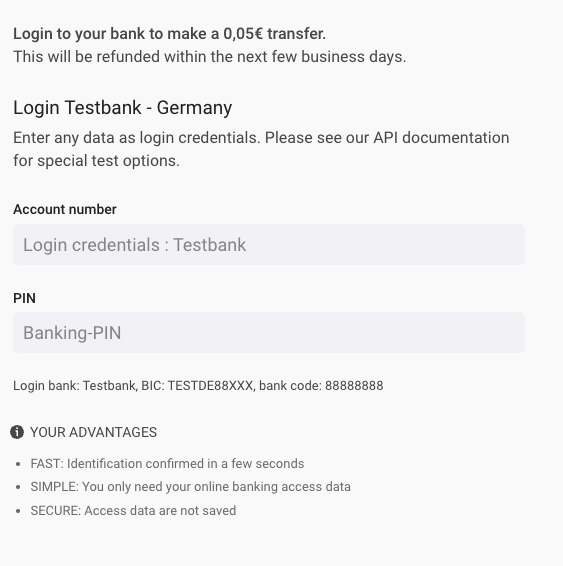
}Go to the URL returned in the previous call and enter any number for the account number and the banking PIN and click NEXT. This screen simulates a login screen, in which the customer must log into their online banking and authorize a 5-cent transfer to validate the account ownership.
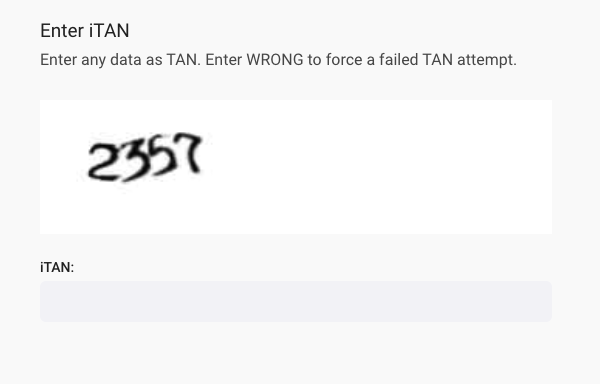
After clicking NEXT, another screen will pop up and you have to enter any TAN number to authorize the transaction. This screen simulates the screen in which the customer must enter the SMS OTP they received on their verified mobile number to authorize the transaction.
After successful payment transfer, complete the QES process by doing the following steps:
- Call PATCH Start e-signing process. Add the
person_idand identificationidin the request URL.
Request
PATCH /v1/persons/{person_id}/identifications/{id}/authorizeResponse
{
    "id": "a7a57dadfcc83117b5c3b72f4113be25cidt",
    "reference": null,
    "url": "https://fts-payment-initiation-wizard.solaris-sandbox.de/index.html?wizard_session_key=bfo5r16AMLlt6ZEX9Oh3JUWIkTelorupBwzIlJRR&interface_id=da05",
    "status": "confirmation_required",
    "completed_at": null,
    "method": "bank",
    "proof_of_address_type": null,
    "proof_of_address_issued_at": null,
    "iban": "DE11110101010100000020",
    "terms_and_conditions_signed_at": "2020-07-07T11:36:29.000Z",
    "authorization_expires_at": "2022-08-11T08:38:21.000Z",
    "confirmation_expires_at": "2022-08-11T08:37:23.000Z",
    "current_reference_token": "1234-5678",
    "estimated_waiting_time": null
}- Call PATCH Confirm e-signing process. Add the
person_idand identificationidin the request URL.
Request
PATCH /v1/persons/{person_id}/identifications/{id}/confirmResponse
{
    "id": "a7a57dadfcc83117b5c3b72f4113be25cidt",
    "reference": null,
    "url": "https://fts-payment-initiation-wizard.solaris-sandbox.de/index.html?wizard_session_key=bfo5r16AMLlt6ZEX9Oh3JUWIkTelorupBwzIlJRR&interface_id=da05",
    "status": "confirmed",
    "completed_at": null,
    "method": "bank",
    "proof_of_address_type": null,
    "proof_of_address_issued_at": null,
    "iban": "DE11110101010100000020",
    "terms_and_conditions_signed_at": "2020-07-07T11:36:29.000Z",
    "authorization_expires_at": "2022-08-11T08:38:21.000Z",
    "confirmation_expires_at": "2022-08-11T08:37:23.000Z",
    "current_reference_token": "1234-5678"
}- Afterward, call GET Retrieve a person identification and the response should include a
successfulstatus and the signed documents with their IDs.
Request
GET /v1/persons/{person_id}/identifications/{id}Response
{
    "id": "a7a57dadfcc83117b5c3b72f4113be25cidt",
    "reference": null,
    "url": "https://fts-payment-initiation-wizard.solaris-sandbox.de/index.html?wizard_session_key=bfo5r16AMLlt6ZEX9Oh3JUWIkTelorupBwzIlJRR&interface_id=da05",
    "status": "successful",
    "completed_at": "2022-08-11T08:29:43.000Z",
    "method": "bank",
    "proof_of_address_type": null,
    "proof_of_address_issued_at": null,
    "address": null,
    "documents": [
        {
            "id": "a6585ea2b053a69fb705a0eb963084cfcdoc",
            "name": "a7a57dadfcc83117b5c3b72f4113be25cidt_prepared_for_signing_kyc_report.pdf",
            "content_type": "application/pdf",
            "document_type": "QES_DOCUMENT",
            "size": 88139,
            "customer_accessible": false,
            "created_at": "2022-08-11T08:25:11.000Z"
        },
        {
            "id": "4d1aa91e091e375e30e94de4ab1cf0f4cdoc",
            "name": "SIGNED_a7a57dadfcc83117b5c3b72f4113be25cidt_prepared_for_signing_kyc_report.pdf",
            "content_type": "application/pdf",
            "document_type": "SIGNED_QES_DOCUMENT",
            "size": 88139,
            "customer_accessible": false,
            "created_at": "2022-08-11T08:29:43.000Z"
        }
    ],
    "iban": "DE11110101010100000020",
    "terms_and_conditions_signed_at": "2020-07-07T11:36:29.000Z",
    "authorization_expires_at": "2022-08-11T08:38:21.000Z",
    "confirmation_expires_at": "2022-08-11T08:37:23.000Z",
    "current_reference_token": "1234-5678"
}The following table includes the possible failure reasons for Bankident. These failure reasons are also relevant for the Bankident+ method.
| HTTP status | Error code | Description | UI user error message | Actions |
|---|---|---|---|---|
| 412 | IBAN_USAGE_LIMIT_EXCEEDED | The provided IBAN has been blacklisted due to reaching the limit of failed attempts. | DE: Sie haben das Limit an Versuchen erreicht. Bitte fahren sie mit der Video-Identifizierung fort. EN: You have reached the limit of attempts. Please continue with video identification. | Potential fraud attempt; onboarding should stop. Show a generic message to the customer. |
| 412 | MOBILE_NUMBER_NOT_VERIFIED | The customer does not have a verified mobile number. | Verify the mobile number and retry the call. | |
| 412 | IDENTIFICATION_ATTEMPTS_EXCEEDED | The mobile number or the combination of first_name and last_name reached the limit of failed attempts. | DE: Diese Identifikationsmethode steht nicht zur Verfügung. Bitte fahren sie mit der Video-Identifizierung fort. EN: This identification method is not available. Please continue with video identification. | Potential fraud attempt; onboarding should stop. Show a generic message to the customer. |
| 422 | ALREADY_IDENTIFIED_SUCCESSFULLY | The customer has been successfully identified. | DE: Sie haben sich bereits erfolgreich identifizert. EN: You have already successfully identified yourself. | Stop onboarding. Ask the customer to use their existing account. |
| 412 | MATCH_FOR_PERSON_DATA_NOT_FOUND | The customer's record could not be found in SCHUFA. This usually happens to customers who recently moved to Germany. | DE: Diese Identifikationsmethode steht nicht zur Verfügung. Bitte fahren sie mit der Video-Identifizierung fort. EN: This identification method is not available. Please continue with video identification. | No action needed. |
| 412 | PERSON_ACCOUNT_MATCH_NOT_FOUND | We could not establish a connection between the customer and the provided IBAN. | DE: Für diese IBAN steht diese Identifikationsmethode nicht zur Verfügung. Bitte versuchen Sie es mit einer anderen IBAN oder fahren Sie mit Video-Identifizierung fort. EN: This identification method is not available for this IBAN. Please try another IBAN or continue with video identification. | The customer can try again with a different IBAN. |
| 412 | PREVIOUS_IDENT_NOT_FOUND | The customer did not meet the identification preconditions. | DE: Diese Identifikationsmethode steht nicht zur Verfügung. Bitte fahren sie mit der Video-Identifizierung fort. EN: This identification method is not available. Please continue with video identification. | The customer cannot be onboarded with this identification method. |
| 412 | PERSON_MISSING_REQUIRED_DATA | The customer is missing some of the required data. | DE: Ein Fehler ist aufgetreten. Bitte kontaktieren Sie den Support. EN: An error has occurred. Please contact Solaris support. | Ask the customer to enter the missing data and retry the call. |
| 412 | DEPENDENCY_ERROR | External provider service failure. | DE: Ein Fehler ist aufgetreten. Bitte kontaktieren Sie den Support. EN: An error has occurred. Please contact Solaris support. | Contact Solaris. |
| 412 | INVALID_MODEL | Technical error. | DE: Ein Fehler ist aufgetreten. Bitte kontaktieren Sie den Support. EN: An error has occurred. Please contact support. | Check the request JSON body and retry the call. Contact Solaris if the issue is not solved. |
| 412 | INTERNAL_REQUEST_ERROR | Technical error. | DE: Ein Fehler ist aufgetreten. Bitte kontaktieren Sie den Support. EN: An error has occurred. Please contact Solaris support. | Contact Solaris. |
| 412 | GENERIC_ERROR | Technical error. | DE: Ein Fehler ist aufgetreten. Bitte kontaktieren Sie den Support. EN: An error has occurred. Please contact Solaris support. | Contact Solaris. |
| 412 | ACCESS_BY_AUTHORIZED_HOLDER | The customer is not the account holder but an authorized person on the account. This is not allowed for fraud protection reasons. | DE: Sie sind nicht Kontoinhaber. Bitte nutzen sie eine andere IBAN oder fahren Sie mit der Video-Identifizierung fort. EN: You are not the account holder. Please use another IBAN or continue with video identification. | The customer can try again with a bank account of which they are the account holder. |
| 412 | EXPIRED | The identification has expired (happens after 30 days). | DE: Ihr Identifizierungsprozess ist abgelaufen. Bitte versuchen Sie es erneut. EN: Your identification attempt has expired. Please try again. | A new identification must be created for the customer to restart the process. |
| 412 | ACCOUNT_SNAPSHOT_FAILED | The payment initiation (5-cent transfer) failed. This step is done by an external provider; failure could have various reasons. | DE: Die Bankanmeldung oder Überweisung ist fehlgeschlagen. Bitte versuchen Sie es erneut. EN: The bank login or transfer has failed. Please try again. | The customer can try again with a different IBAN. |
| 412 | JOINT_ACCOUNT | The provided account is a joint account. This is not allowed for fraud protection reasons. | DE: Gemeinschaftskonten sind nicht unterstützt. Bitte nutzen sie eine andere IBAN oder fahren Sie mit der Video-Identifizierung fort. EN: Joint accounts are not supported. Please use a different IBAN or continue with video identification. | The customer must use an account solely owned by them. |
| 412 | ACCOUNT_SNAPSHOT_EXPIRED | The payment initiation expired (10-minute limit). | DE: Die Anmeldesitzung der Bank ist abgelaufen. Bitte versuchen Sie es erneut. EN: The bank login session has expired. Please try again. | The customer did not confirm the 5-cent transfer within the dedicated 10-minute time frame. They must restart the process. |
The following are common questions and answers related to the integration process of Bankident solution. If you have other questions or use cases not mentioned in this guide, contact your Partner Manager for support.
How many identification attempts can a user make?
A single person resource can make a maximum of 20 attempts before receiving a generic error message.
Can I reuse a successful identification for different companies?
There are no technical restrictions on reusing an identification. However, you must define GDPR measures regarding data cleanup and consent reuse.
Are non-German IBANs supported?
No. Bankident currently supports only German IBANs. If your customer does not have a German IBAN, consider using VideoIdent or Fourthline.
Which mobile country codes are supported?
Solaris supports all mobile country codes except:
- Iran (+98)
- North Korea (+850)
Are international addresses supported?
Yes, addresses from any country are accepted. However, identification success rates are significantly lower for addresses outside Germany. SCHUFA primarily stores data for German residents, so matching an international address is less likely to succeed.
How long is the SMS token valid?
The SMS OTP for the Qualified Electronic Signature (QES) process is valid for 10 minutes.
What is the timeout for the bank connection widget?
The session times out 10 minutes after the customer initiates the payment. The timer tracks the window between the payment (cent transfer) and the final signature; it does not include the time spent on data entry.