
Postbox- Copy for LLMCopy page as Markdown for LLMs
- View as Markdown
 Open this page as Markdown
 - Open in ChatGPTGet insights from ChatGPT
- Open in ClaudeGet insights from Claude
- Connect to CursorInstall MCP server on Cursor
- Connect to VS CodeInstall MCP server on VS Code
- Copy for LLMCopy page as Markdown for LLMs
- View as MarkdownOpen this page as Markdown
- Open in ChatGPTGet insights from ChatGPT
- Open in ClaudeGet insights from Claude
- Connect to CursorInstall MCP server on Cursor
- Connect to VS CodeInstall MCP server on VS Code
The Postbox serves as a communication channel between Solaris and its customers for banking documents.
As a bank, Solaris must regularly provide certain documentation to its customers. With Postbox, Solaris uploads this documentation to a central repository, which you then provide to your customers via your frontend using the Solaris Postbox API.
This guide describes how to implement this feature in your solution.
Currently, Solaris provides the following types of documents via Postbox:
- Balance confirmations
- Fee summary statements (Currently only for Spain). Fee summary statements can also be requested. See Fee summary statements for details.
Ensure that your Postbox implementation supports all types of Postbox documents.
The process for retrieving Solaris documents and providing them to customers is as follows:
- Solaris produces a new document and uploads it to the Postbox as an item.
- Solaris notifies partners of the new item (and provides the
item_id) using the POSTBOX_ITEM_CREATED webhook. - Call the
GET Index Postbox itemsendpoint to retrieve all Postbox items. You can filter the response based on which items to show to the customers (e.g., by document type). - Call the GET Retrieve a Postbox item endpoint to retrieve the metadata around a specific item to display to a single customer.
- Call the GET Download document endpoint to download the actual document contained in the item.
- Display the downloaded PDF document to the customer.
- If the document requires a confirmation (specified in the
customer_confirmationproperty), your solution must collect the customer's confirmation and send it to Solaris using the POST Create confirmation endpoint.
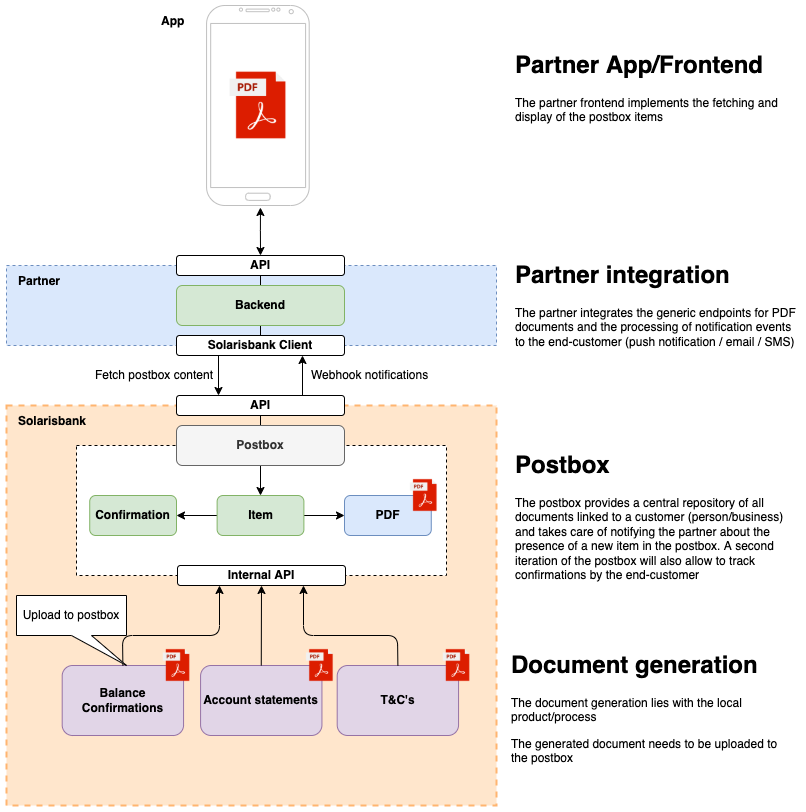
An item represents a document that Solaris created for the customer, along with its associated metadata. An item can belong to either a Person or a Business.
Each item has an associated document. The document is stored as a binary and must be retrieved using the GET Download document endpoint.
Items may include two properties that require additional action from your solution:
customer_notification: Iftrue, this item has a higher priority, and customers should receive a notification to read it from your solution.customer_confirmation: Iftrue, you must collect the customer's confirmation for this item and send it to Solaris using the POST Create confirmation method.
A confirmation represents an instance when the customer acknowledges that they have read (and accepted) the contents of an item.
Solaris only requires confirmations for specific types of documents, not for all documents.
Subscribe to the POSTBOX_ITEM_CREATED webhook to receive notifications whenever Solaris publishes a new Postbox item.
Example payload:
{
  "id": "d347d967ae8c4d58b93e6698b386cae9pbxi",
  "belongs_to": "3e0b990bb0f49eb1a43904e78461c0cbcper",
  "owner_type": "Person",
  "created_at": "2022-01-04T13:45:05Z",
  "document_date": "2021-06-30",
  "document_type": "BALANCE_CONFIRMATION",
  "name": "Item's name",
  "description": "Description",
  "customer_notification": true,
  "customer_confirmation": false,
  "document_size": 1667317,
  "document_content_type": "application/pdf"
}You must implement the following API endpoints to use the Postbox feature:
GET Index Postbox items- GET Retrieve a Postbox item
- GET Download Postbox item document
Solaris offers the following endpoints for testing the Postbox feature:
Creates a Postbox item for the person specified in the request URL. Note that you can only use this endpoint for testing purposes on the testing, staging, and sandbox environments.
Creates a Postbox item for the business specified in the request URL. Note that you can only use this endpoint for testing purposes on the testing, staging, and sandbox environments.
Generates an empty PDF document on Solaris' servers for use as a Postbox item. Note the following:
- The
Content-Typeheader for this request must beapplication/json. - This endpoint can only be used on the testing, staging, and sandbox environments.